Two kinds of flicker
People say “flicker” for two different problems, and they have different fixes.
- Edge shimmer. The outline of hair, shoulders or fingers gets a slightly different opacity in every frame, so it seems to crawl. It comes from models that estimate each frame on its own, from low contrast between subject and background, and from motion blur.
- Region pops. A whole patch flips between kept and removed in a single frame: a gap under an arm, a chair back, a reflection. It is less common, but much easier to see.
How we measured it
We took three stock clips that had been run through the same model this site uses in production (named on the About page), decoded the alpha channel of each downloaded WebM, and compared every frame with the one before it at half resolution.
The hard part is not counting motion as flicker. Our first pass flagged thousands of pixels per frame, but nearly all of them sat beside a moving hand or a swinging lock of hair. So the final measurement ignores every pixel within 8 pixels of anything that moved in the original footage. What remains is the mask changing where the picture did not.
| Clip (90 frames each) | Background pixels that flashed, average / worst frame | Edge samples on still parts that jumped |
|---|---|---|
| Podcast host, mostly still | 1 / 10 | 0.53% of 10,235 (average shift 5/255) |
| Hair flip, moving almost the whole time | 1 / 31 | 11.8% of 663 (too few still edges to judge) |
| Curly hair, arm across body | 55 / 2,094 | 63.5% of 6,735 (driven by the gap below) |
“Jumped” means the alpha value changed by at least 32 out of 255 between two frames, about the point where a change becomes visible over a solid color. For scale, a half-resolution frame has 518,400 pixels, so the podcast clip’s worst frame changed 0.002% of the picture.
What steady edges look like
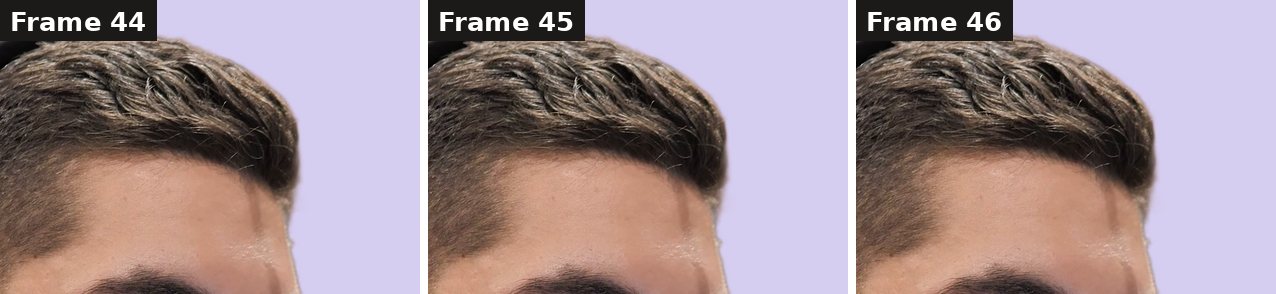
Frames 44–46 of the podcast clip, composited over lilac so any change in the outline would show. Source footage: Mixkit. The person shown is not affiliated with this product.
Short hair against a plain wall is a fair test of shimmer: the strands are thinner than a pixel at the edges, so a per-frame model has to guess their opacity every time. Across 90 frames the outline did not crawl.
The one jump we found: enclosed gaps
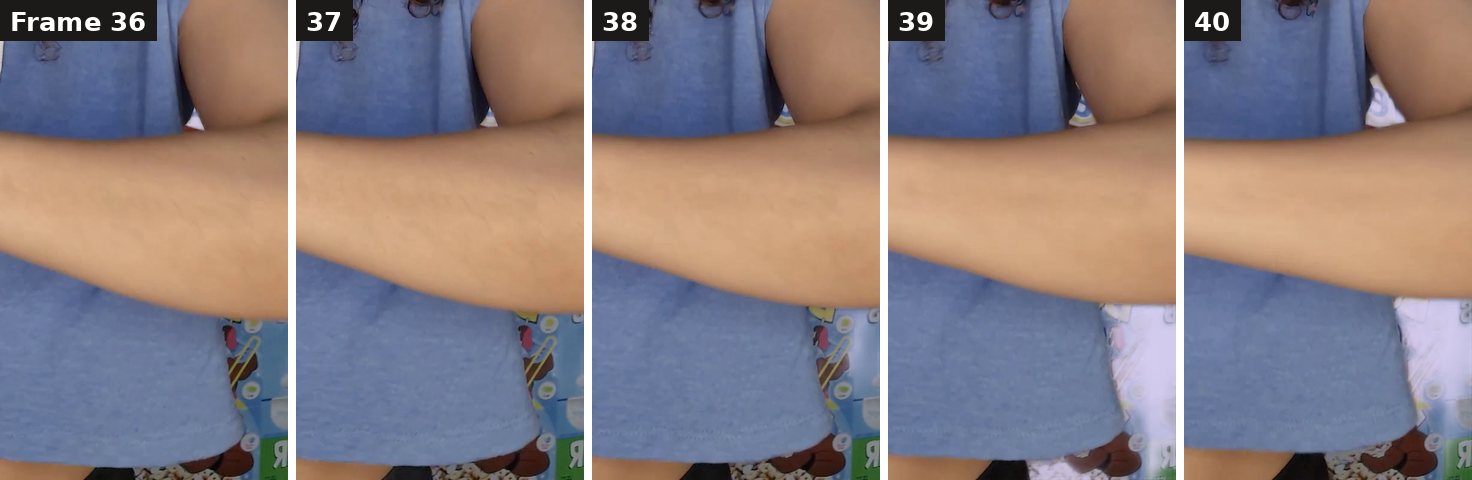
Frames 36–40 of the curly-hair clip over lilac. The background visible between arm and body is kept until frame 38 and removed from frame 39. Source footage: Mixkit. The person shown is not affiliated with this product.
When an arm rests against the body, the background showing through the gap is cut off from the rest of the background. The model has to decide whether that small island belongs to the person, and as the arm moves, the decision can flip. On a new background it reads as a patch of the old room that vanishes in one frame.
Two ways to avoid it:
- When shooting, keep gaps clearly open or clearly closed: arms away from the body, or resting against it.
- After removal, convert the result to a PNG sequence, mask the few affected frames in your editor, then turn the frames back into a transparent WebM. You fix two frames instead of the whole clip.
How to check your own cutout
- Leave the checkerboard. It is busy enough to hide a patch that appears for two frames. Use a bright solid color.
- Step frame by frame where arms meet the body, where hair crosses a busy background, and during fast movement.
- Test the downloaded file, not only the preview. The transparency checker runs in your browser with no account, and the two-background test shows how the file will composite.
On the video background remover, the result preview switches between grid, white, dark and green, so you can do the first two checks before downloading.
Reduce flicker before you upload
- Contrast. A subject that differs in color and brightness from the background gives the model clear edges in every frame.
- Steady light. Flickering lights and auto-exposure change the edges from frame to frame, even when nothing moves.
- Less motion blur. A faster shutter keeps hands and hair sharp, so there is less half-transparent edge to guess.
- Keep one master. Every lossy re-encode of the alpha channel adds noise. Edit from the ProRes 4444 file, included free on clips up to 15 seconds, and export WebM once at the end.
Every finished video job on this site is checked for a real alpha channel before the download is offered, and new accounts get 5 free credits after Google sign-in, enough for a 5-second test. Try a short clip with the hardest part of your footage—hair, a raised arm, fast movement—and step through it before committing a long one.
Questions people are asking
Why do the edges of my background removal flicker?+
Most AI background removers estimate the mask one frame at a time. When soft pixels such as hair, motion blur or low-contrast edges get a slightly different opacity in each frame, the outline appears to shimmer. In our test with the model this site uses, edges on parts of the subject that held still changed visibly in only 0.53% of samples.
Is flicker caused by WebM compression?+
It can add to it, because VP9 compresses the alpha channel lossily. Our measurements were taken from the downloaded WebM files, so compression is already included in the numbers. For editing, use the ProRes 4444 master, which this site includes free on clips up to 15 seconds.
Can I fix a few bad frames without redoing the whole clip?+
Yes. Convert the transparent result to a PNG sequence, repair the affected frames with a mask in your editor, and convert the sequence back to WebM. Both converters are free for files up to 50 MB and 10 seconds.
How do I see flicker that the checkerboard hides?+
Play the cutout over a bright solid color and step through it frame by frame. A checkerboard is busy enough to hide a patch that appears for two frames. The video tool’s result preview can switch between grid, white, dark and green backgrounds.
Disclosure: BG Remover Online is this site’s product. The measurements above are our own, on three short clips; they describe these clips, not every video. AI assistance was used to draft and edit this article.