Remove a green screen — free credits
One second of green screen, two ways
The test clip is a 1280×720, 30 fps stock shot of a man talking in front of a green screen. It is a realistic one rather than a studio ideal: the green is dark and unevenly lit, there are creases in the backdrop, and he wears a black T-shirt. We cut one second from it (0.97 s, 29 frames) and removed the background twice.
- AI cutout — the same model and settings this site uses for video, on the uploaded clip as it was. It took 12.5 seconds and would cost 1 credit.
- Chroma key — FFmpeg's
chromakeyfilter, with the key colour sampled from the screen. We tried six settings and kept the best one (similarity 0.03, blend 0.03).

Source footage: Pexels. The person shown is not affiliated with this product. Both cutouts are composited over lilac so leftovers are easy to see.
What the edges show
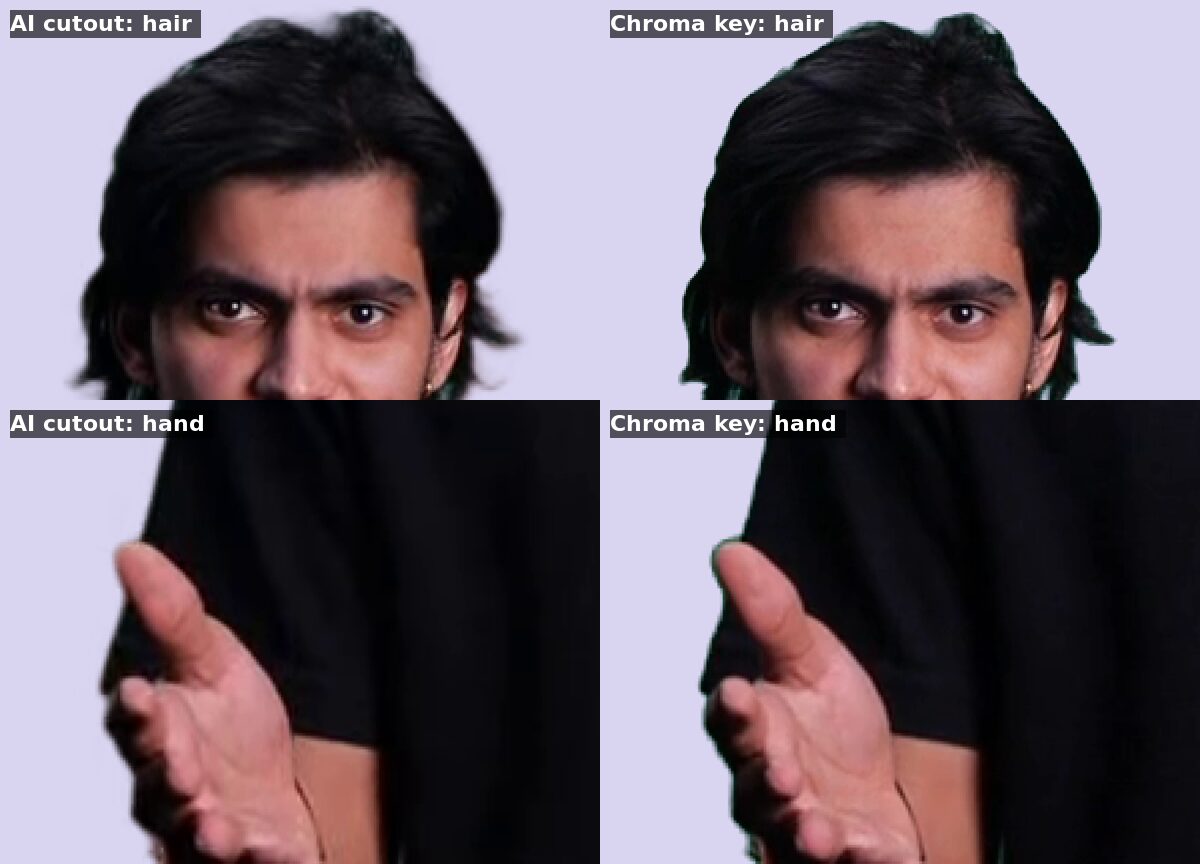
The same frame at 2× zoom. Left: AI cutout. Right: chroma key at its best setting.
- Green fringe. The chroma key leaves a green rim along the hair tips and the edge of the hand — the screen's colour reflected onto the subject. The AI cutout shows none in this clip.
- Uneven light. The darker lower-left corner of the screen survives the key as a grey patch. Raising the tolerance clears it, but then the black T-shirt starts to turn see-through: a dark shirt and a dark green sit too close together for one tolerance to separate them.
- Softness. The keyed hair is a little crisper; the AI edge is slightly softer. On a busy background that softness is rarely visible; on a flat colour it can be.
The finished AI cutout is a 1-second transparent WebM (95 KB). Drop it onto the free transparency checker to see it over any colour.
When a chroma key is still the better tool
A key is free, runs in your editor in real time, and has no length limit. With a bright, evenly lit screen, a subject standing well away from it, and no green in the wardrobe, a good keyer in Premiere Pro, Resolve or After Effects does excellent work — and has more controls than the FFmpeg filter used here.
The AI route earns its place when the footage fights the key: an uneven or wrinkled screen, a backdrop that is too dark, dark or greenish clothing, fine hair, or green light spilling onto the subject. It also needs no green screen at all, so the same upload works for footage shot anywhere.
Remove a green screen in three steps
- Upload the clip — up to 60 seconds and 200 MB. Anything above 1080p or 30 fps is converted to 1080p 30 fps automatically.
- The AI cuts the subject out, green screen and all. Every finished job is checked to carry a real alpha channel before the download appears.
- Download the format you need — transparent WebM for web and OBS, and the ProRes 4444 master on clips up to 15 seconds for editing software.
Questions people are asking
Can I remove a green screen from a video without chroma keying?+
Yes. Upload the clip as it is and the AI separates the person from the background, whatever its colour. There is no key colour to pick and no tolerance to tune, so uneven lighting and creases in the screen matter much less than they do to a keyer.
Does the AI cutout leave a green edge around hair?+
In our 1-second test it left no visible green rim on hair or hands, where a chroma key at its best setting did. Every clip is different, so check your own result over a contrasting colour in the free transparency checker before using it.
How much does it cost to remove a green screen from a 10-second clip?+
10 credits: video costs 1 credit per started second. New accounts get 5 free credits after Google sign-in, enough to test a 5-second clip end to end. Failed jobs return their credits.
Can I get a transparent MP4 from green-screen footage?+
No. MP4 cannot carry an alpha channel, so the green would have to be replaced by another solid colour. For transparency use VP9-alpha WebM for browsers and OBS, or ProRes 4444 for editing software.
Which chroma key settings was the AI cutout compared against?+
FFmpeg's chromakey filter with the key colour sampled from the screen, at six settings; the best was similarity 0.03 and blend 0.03. The keyers built into Premiere Pro, DaVinci Resolve and After Effects have more controls and can do better than this filter on the same footage.