Remove a white background — free credits
Test 1: a logo on white
A 1200×800 logo made for this test: a navy ring around an orange disc with a white centre, serif lettering with round counters, and a thin rule. We ran it through the same model and settings this site uses for images, and measured the PNG that came back.

The logo was made for this page. The cutout is shown over dark grey so remaining white is visible.
- The outside white went. 91% of the pixels came back fully transparent, including the counters inside the letters O.
- The white inside the mark stayed. The band between the ring and the disc and the hole in the centre came back fully opaque white. Background removal decides what the subject is, and white enclosed by a shape is read as part of it — right if the logo is meant to sit on a white badge, wrong if the background should show through.
- A thin light rim. Over a dark background, a faint pale edge is visible around the lettering.
Test 2: a signature on paper
A blue-ink signature on off-white paper, shaded darker towards one corner as a phone photo would be, above a printed grey signature line.
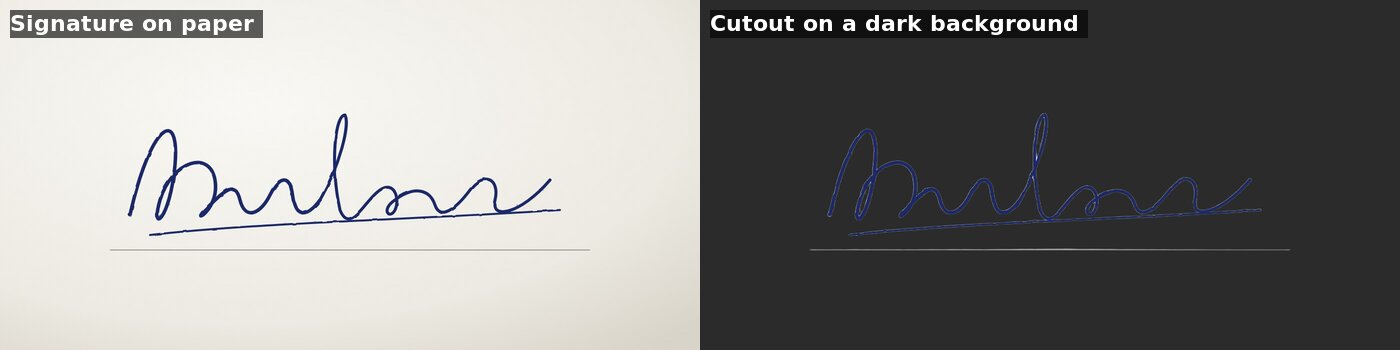
The signature was drawn for this page. The cutout is shown over dark grey.
- The paper went, shading and all — the light corner and the dark corner both came back fully transparent.
- The ink stayed, at an average of 240 out of 255 opacity across the strokes, with a slightly pale rim on dark backgrounds.
- The printed line stayed too, at roughly 40% opacity. If you only want the ink, erase it.
Fixing what stays white
- Holes in a logo: open the PNG in a free editor such as GIMP or Photopea and delete the enclosed white with the magic wand. GIMP's Colors › Color to Alpha removes every white pixel at once — including white that is meant to be there, so use it only on flat graphics.
- If you have the original logo file (SVG, AI, EPS or PDF), export a PNG from that instead. A file drawn with transparency beats any cutout.
- Signature lines and stray marks: erase them in the editor, or photograph the signature on blank paper in even light.
- A pale rim on dark backgrounds: shrink the selection by one pixel before deleting, or place the cutout on a light background where the rim disappears.
Remove a white background in three steps
- Upload a JPG, PNG or WebP — up to 15 MB and 8000 px per side.
- The AI removes the background in seconds. Each image costs 1 credit, and failed jobs are refunded.
- Download a transparent PNG, then check it over a dark colour in the free transparency checker. Keep it as PNG: a transparent background is lost when saved as JPG.
Questions people are asking
Will removing a white background also clear the white inside a logo?+
Not always. In our test the white outside the logo and inside the letter O became transparent, but the white enclosed by the logo mark stayed opaque. Check the PNG over a dark colour and delete any enclosed white in an image editor.
Can I remove the white background from a signature for a document?+
Yes. Upload a photo or scan of the signature and download a transparent PNG to place over a document. In our test the paper and its shading were removed and the ink kept; a printed signature line stayed at partial opacity and needed erasing.
Does a transparent PNG keep its transparency in Word, PowerPoint or Google Docs?+
Yes. Inserting a PNG keeps its transparent areas in Word, PowerPoint, Google Docs and Google Slides. Transparency is lost when the image is saved or converted to JPG, which has no alpha channel.
How much does it cost to remove a white background?+
1 credit per image. New accounts get 5 free credits after Google sign-in, with no watermark on the PNG. Failed jobs return their credits.