
Upload a transparent WebM or MOV
Any video with a real alpha channel — a WebM from the video background remover, or a ProRes 4444 export. A normal MP4 has no transparency to carry over.
Need a cutout as a sticker, a chat reaction or an animation on a web page? Upload a transparent WebM or MOV and download it as a transparent GIF — or as an animated WebP that keeps soft edges.
Any video with a real alpha channel — a WebM from the video background remover, or a ProRes 4444 export. A normal MP4 has no transparency to carry over.
The clip is brought to at most 480 pixels on its long side and 15 frames per second — the sizes animations are actually shown at — then encoded with its transparency.
Every result is checked for real transparent pixels before it is offered. A clip whose frames never change comes out as a single transparent WebP image.
The same real 1080p background-removal result — a podcast host with headphones and soft hair, 3.75 seconds — converted both ways.
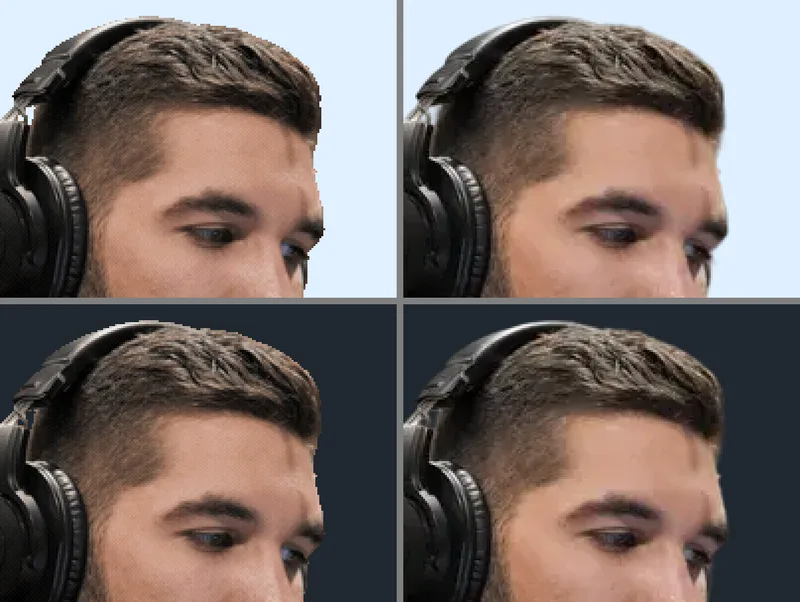
GIF stores transparency as one reserved palette colour, so a pixel is either fully clear or fully solid; anything below half opacity is dropped. Hair, motion blur and soft shadows lose their in-between pixels, and the edge looks stepped over a contrasting background. WebP keeps the full 8-bit alpha channel, so the same edges stay soft — at about a quarter of the size. Bigger and smoother GIFs grow fast: 720 pixels more than doubled the file, and 24 fps added 60%.
Upload forms, older tools and anywhere that takes GIF but not WebP. Best for cutouts with clean, hard edges — logos, text, flat graphics — where GIF’s two-level transparency does no harm.
Current versions of Chrome, Edge, Firefox and Safari display animated WebP. Choose it for people, hair, smoke or anything with soft edges, and whenever file size matters.
Past a few seconds, or above 480 pixels, a transparent WebM is far smaller than either: the same clip was 0.23 MB per second at 1080p. OBS overlays and video players want WebM, not GIF.
Both read a transparent WebM; for a MOV, drop -c:v libvpx-vp9 before -i.
ffmpeg -c:v libvpx-vp9 -i in.webm -filter_complex "fps=15,scale=480:-2,split[a][b];[a]palettegen=reserve_transparent=1[p];[b][p]paletteuse=alpha_threshold=128" -loop 0 out.gif
ffmpeg -c:v libvpx-vp9 -i in.webm -vf fps=15,scale=480:-2 -c:v libwebp_anim -pix_fmt yuva420p -q:v 75 -loop 0 out.webp
If the frames never change, add -lossless 1: the lossy encoder dropped the alpha of a static clip in our tests.
Without -c:v libvpx-vp9 before -i, FFmpeg’s default VP9 decoder ignores the alpha and the GIF comes out with a solid background. Why
Use a supported SDR HEVC alpha MOV/MP4 as input. GIF reduces transparency to a single transparent palette entry; animated WebP can retain soft alpha edges. These outputs remain free-tier only, up to 50 MB and 10 seconds. They do not generate an HEVC file. HEVC alpha troubleshooting →
Start from a video with a real alpha channel, such as a transparent WebM or a ProRes 4444 MOV, and convert it here. If your video has a normal background, remove it first with the video background remover, then convert the result.
GIF has only two levels of transparency: each pixel is fully clear or fully solid. Soft edges such as hair lose their in-between pixels. An animated WebP keeps 256 levels and looks smooth.
For transparency, yes: in our test the WebP was about a quarter of the GIF's size and kept soft edges. Use GIF only where WebP is not accepted.
Not directly: an MP4 has no transparency to keep. Remove the background with the video background remover, which outputs a transparent WebM, then convert that to GIF or WebP here. Starting from a GIF that has a background? The GIF background remover takes the GIF directly and exports a transparent GIF from the result.
The free converter takes clips up to 10 seconds and 50 MB and outputs at most 480 pixels on the long side at 15 fps. For bigger or longer animations, a transparent WebM video is much smaller.
Yes. Sign in with Google and use up to 3 free conversions a day across the converters. After that, GIF and WebP conversions cost 2 credits each within the same 50 MB and 10-second limits. Extended GIF and WebP conversion accepts up to 200 MB and 30 seconds for 4 credits. Output stays at up to 480 px and 15 fps, with a 64 MiB limit. Paid results stay in My videos for 3 days.