Add the animated GIF
Up to 60 seconds and 200 MB. The page reads the length from the GIF's frame timing and shows the credits before you start.
Upload an animated GIF up to 60 seconds. The AI cuts the subject out of every frame, and you download a transparent WebM—or turn it back into a transparent GIF or animated WebP for free.

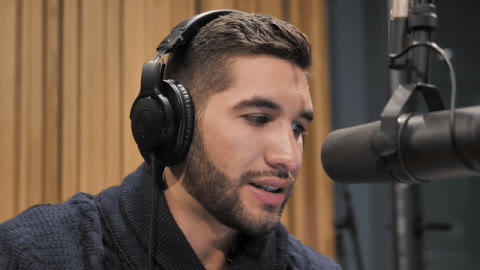
A real result: a 1-second, 15-frame GIF run through this site's standard model and exported back to GIF. Stock video from Mixkit; the person shown is not affiliated with BG Remover Online.
GIF in, transparent GIF out
Get a transparent WebM, then export it back to a transparent GIF or animated WebP at no extra cost.
Free to try with a Google account. New accounts get 5 credits.
Output
Choose your destination after processing: WebM for websites / OBS, ProRes 4444 for editing, PNG frames, or GIF / animated WebP. Extra formats are included for clips up to 15 seconds; GIF / WebP output is up to 480 px and 15 fps.
Checking processing availability…

AI matting
Following edges across frames
Preview colors are not baked into your transparent file.
The source was a 1-second GIF of the podcast host on our homepage: 640×360, 15 frames, 2.2 MB. We uploaded it with the standard model in Person mode, then exported the result in both animation formats. The AI step took 11 seconds.
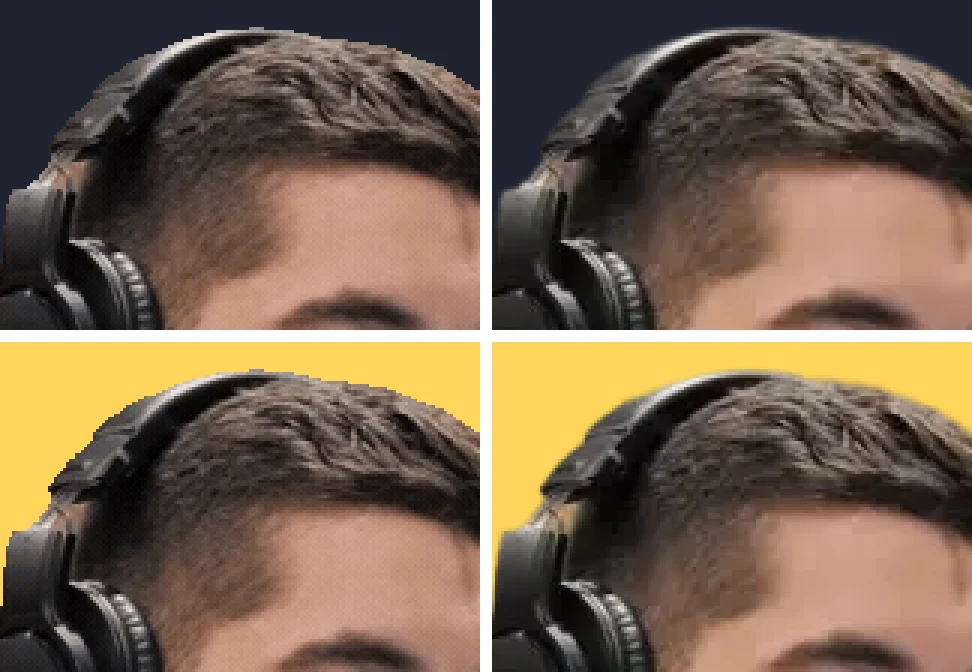
The GIF is almost four times the size of the WebP and keeps less detail at the edges. Both play on their own as images, with no video player needed.
A GIF has no partial transparency: each pixel is either fully visible or fully clear. When the result is exported to GIF, pixels that are less than half opaque become clear and the rest become solid. Soft hair edges turn into steps.
In one frame of this result, 5.2% of the pixels were partly transparent—mostly hair and the outline of the headphones. The animated WebP keeps all of them; the GIF has to round each one.
Video → GIF / WebP converter →Check a file for transparency →
Up to 60 seconds and 200 MB. The page reads the length from the GIF's frame timing and shows the credits before you start.
The GIF is turned into a video and the AI removes the background frame by frame. Person or Object mode is picked from the first frame, so logos and animals are not treated as people.
Download the transparent WebM, or export a transparent GIF or animated WebP from it for free on clips up to 15 seconds.
Yes. Upload the GIF and the AI removes the background from every frame. You get a transparent WebM, and you can export it back to a transparent animated GIF or animated WebP for free.
1 credit per started second with the standard model, so a 1-second GIF uses 1 credit and a 4.2-second GIF uses 5. New accounts get 5 free credits after Google sign-in. Exporting the result to GIF or WebP is free.
GIF stores one fully transparent colour and nothing in between, so soft edges such as hair have to be rounded to either clear or solid. Export animated WebP instead when you need smooth edges; it keeps full alpha and was about a quarter of the GIF's size in our test.
The GIF and animated WebP exports are scaled to at most 480 px on the long side and 15 frames per second, which keeps them small enough to share. The transparent WebM keeps the processed size, up to 1080p.
Then there is nothing to remove, and the upload is refused before any credits are used. A GIF whose background is a solid colour or a scene is processed normally.
Up to 60 seconds and 200 MB for the cutout. The free GIF and WebP exports are available on results up to 15 seconds; longer results download as a transparent WebM.
Yes. The page checks the first frame for a person and switches to Object mode when there is none, so the subject is kept instead of being cleared as background.
Yes. Sign in with Google to get 5 free credits—enough for a GIF up to 5 seconds—with no card needed.